Concepts
How the parts fit together, and the words the other pages use. Read it once you have played the quickstart and want to make NPCs of your own.
The brain and its scores
Every NPC has a brain (NL Brain): on an NL Character already, or added to a pawn of yours. Every so often the brain thinks: it scores each behaviour it knows, and does the best one.
A behaviour’s score is its Weight times each of its considerations, each a number from 0 to 1. Eat’s are how hungry the NPC is and whether it’s daytime, so a hungry NPC at noon scores Eat high and a fed one at midnight scores it 0. Any consideration at 0 makes the score 0, which is how a behaviour says “not now”.
The behaviour being done gets the brain’s Momentum (0.15) added, so a rival must beat it by that much to take over. Without it, two close scores would flicker the NPC between them.
The best score wins at the next think, whatever its Priority (Idle, Normal, Urgent, Combat). Priority matters while the running behaviour isn’t Interruptible: that one runs to its end unless one of higher priority wins, as a call for help does.
The score panel (Npc.Debug <name>) shows every score and the terms it’s the product of:
Hungry 0.72 × Hours 1.00 × Weight 1.20. Npc.Why prints the same in the Output Log.
Behaviours, steps and considerations
A behaviour (an NL Behavior data asset) is something an NPC can do, in three parts:
- how it scores: its considerations, its weight and its priority;
- where it’s done: the Spot kind it needs (a work spot, a bed), or none for where the NPC stands;
- what it does: its steps, run in order. A step that fails ends the behaviour; with Loop on, the steps start over when they finish.
A behaviour with no steps walks to its spot and stays there, which is all Work, Eat and Sleep need. While the NPC is at the spot the behaviour plays its Anim Tag and fills the needs in its Restores. Its Held Prop is in the hand from the moment it’s chosen, on the way too.
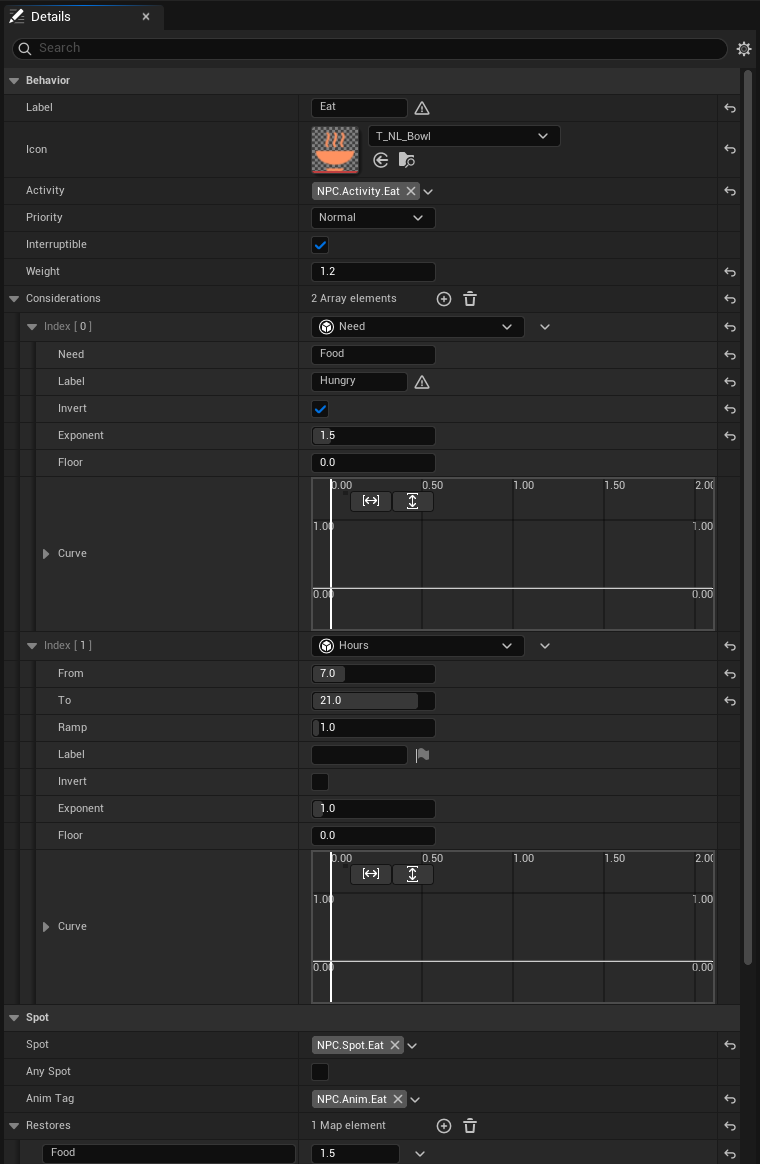
BH_Eat: scored by hunger and the hour, done at an eat spot, filling Food.Considerations read one thing each: a need, the hour, the day plan, the distance to the spot, a memory, the NPC’s alarm, a target, its health, its leader’s distance, a command, its tags. Each turns what it reads into 0 to 1, and its Invert, Exponent, Floor or Curve shape it: Invert turns Food into hunger, a Floor of 0.5 makes a factor tip the choice without vetoing it.
Steps are the actions: go to the spot, use it, wait, bark a line, patrol, investigate, chase, attack, flee, take cover, call for help, block, follow, remember a fact, fire an event for your Blueprint, run a State Tree. A Blueprint made from NL Consideration or NL Step is one more kind, listed beside the plugin’s (how-to).
Roles and day plans
A role (an NL Role data asset) is a kind of NPC: its faction, its needs, its behaviours, its day plan and its animations. Give a brain a role and it’s done; anything set on the brain itself (needs, behaviours, faction, schedule, anim set) adds to the role’s or replaces it, for the one NPC.
A day plan is a list of blocks, each an activity from one hour to another: Sleep 22 to
6, Work 8 to 12. A block can hold only on some Days (NPC.Day.Monday) or Seasons.
The plan doesn’t order the NPC about. It feeds the Day Plan consideration, which gives 1 to a
behaviour whose Activity the plan names now and its Off Plan value otherwise. So the
villager’s Work scores 0 at noon, when the plan says Eat, and hunger decides the rest.
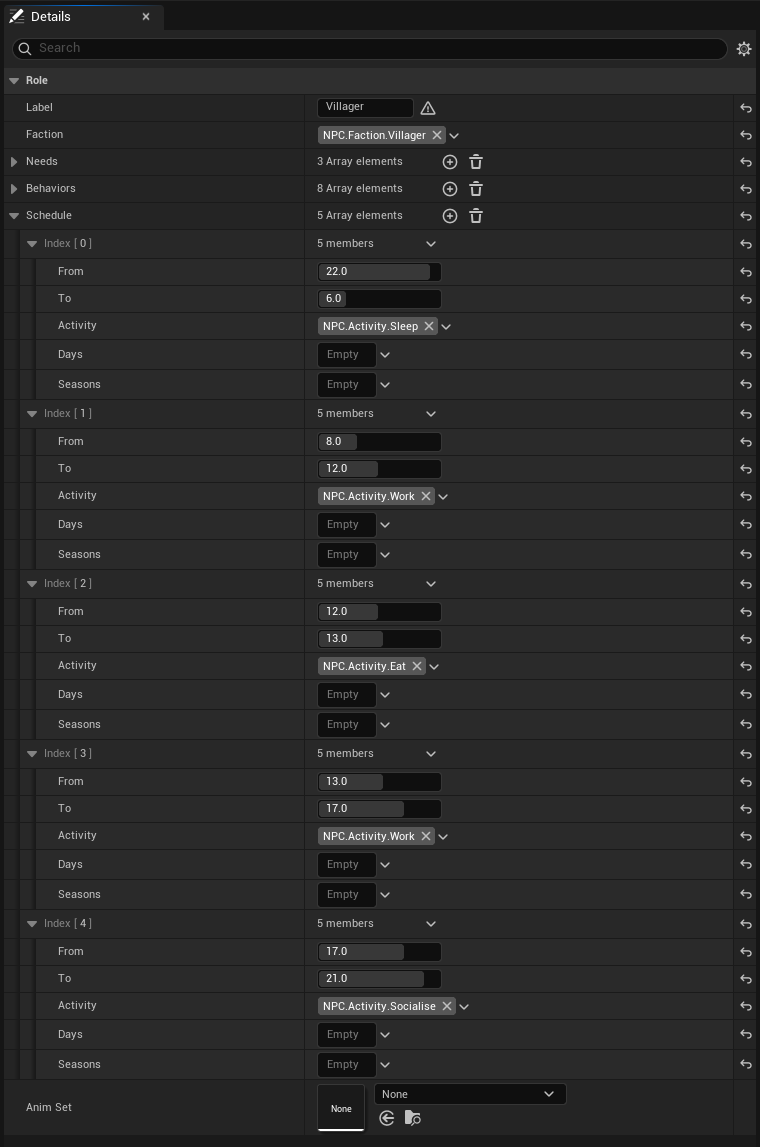
R_Villager: needs, behaviours and a day plan.The shipped roles:
R_Villager, faction Villager: Work, Eat, Sleep, Chat, Sit down, Wander, Take cover and Call for help; sleep 22-6, work 8-12 and 13-17, eat 12-13, socialise 17-21.R_Guard, faction Guard: Patrol, Investigate, Call for help, Chase and Flee; patrol all day.R_Bandit, faction Bandit: Patrol, Investigate, Chase and Flee; patrol all day.R_Companion, faction Companion: Follow, Wait here, Help out and Bar the way; no day plan.
The clock
The world’s NPC life (the NL Subsystem) keeps a clock: the hour, the day from 1, the weekday and the season. It starts at Start Hour and runs Minutes Per Second game minutes a real second, an hour a minute by default. Needs fall by game hours, and a day plan reads it.
Your game’s own time of day can drive it instead: give an object of yours the NL Clock interface and pass it to Set Clock (how-to).
Spots
An NL Spot is a place in the level where a behaviour is done. Its Kind says which
(NPC.Spot.Work, NPC.Spot.Sleep), its arrow which way the NPC faces, and its Capacity how
many at once; with Spread, they stand on a ring round it facing in, as at a well.
A brain scoring a behaviour that needs a spot looks for the nearest free one of the kind. With none free, the behaviour scores 0 and the panel says so: No free Eat spot. Once chosen, the spot is the NPC’s from the moment it sets out until it leaves, so two NPCs never walk to the same bed.
- Only For keeps a spot for one role: the baker’s stall, the guard’s post.
- Body Offset draws the body away from where the NPC stands while it’s at the spot: onto the bed beside it, onto the bench behind it.
- Anim Tag plays over the behaviour’s own: a work spot at a well plays Water.
- Route and Order make patrol points: a patrol walks a route’s spots in order.
When no NL Spot of the kind is free, an Epic Smart Object slot whose activity tags hold the kind serves as one, if the project uses Smart Objects.
Needs and memory
A need is a level from 0 to 1 that falls by Per Hour each game hour: Food, Energy and Social for a villager. A behaviour’s Restores fill it while the NPC does that behaviour at its spot. Needs are names of your choosing; add Thirst or Faith to a role and a behaviour that reads and fills it.
Memory is the facts an NPC remembers about a subject: NPC.Fact.Seen about the player,
NPC.Fact.Hurt about a bandit. Each has a strength from 0 to 1 that halves every Half Life
game hours, and is forgotten under 0.05. The brain remembers what it sees, hears, is hurt by and
is called to help against; your game adds its own facts (NPC.Fact.Helped, or a tag of yours)
with Remember About, and reads them back with Recall About, for dialogue or a quest.
Subjects are named by Get Subject Id: an NPC’s save id, or Player_ and the player’s id for a
player’s pawn.
Senses, alarm and factions
An NL Character’s controller sees 25 m, up to 70° either side of ahead, and hears noises within 20 m, through Unreal’s AI Perception. What it makes of an actor depends on their factions: hostile, neutral or friendly.
A hostile in sight, or a noise, raises the brain’s suspicion, from 0 to 1, and it falls again once nothing is sensed. Under 0.3 the NPC is calm, under 0.8 suspicious (a ? over its head: guards investigate), and from there alarmed (a !: guards chase and call for help, villagers take cover). A hostile in sight fills suspicion in Alarm Time, 1.5 seconds, close up, so it alarms in about 1.2; at the edge of sight it takes about three times as long.
Factions are NPC.Faction.* tags. The role gives an NPC its faction, a player’s pawn is
NPC.Faction.Player, and any actor can carry one among its Tags. The settings’ Attitudes say
who is hostile to whom; with Town Attitudes on, bandits are hostile to villagers, guards,
players and companions, who are friends to each other. A brain’s faction set in play counts at
once: a customer turned thief is a foe to whoever sees him.
Fights
The fight behaviours are unarmed by default: Chase runs at the target, and Attack shoves: Apply Damage and a push. An NL Character has health that the shove takes and that comes back a point a second, and at 0 it is down: no one fights it until it’s back over half, and whoever chased it stands over it a moment. The Health consideration makes a hurt NPC flee.
Your own combat plugs in through the NL Combatant interface on the NPC: Get NL Health for its health, NL Attack to play your attack instead of the shove, Is NL Defeated for out of the fight (how-to).
Animation by tag
The plugin ships no animation. Each behaviour, step and spot sets an animation tag on the
brain (NPC.Anim.Work, NPC.Anim.Sit, NPC.Anim.Sleep), and two things answer it:
- Your animations. A role’s Anim Set maps a tag to a montage, or to a sequence played in
a slot of your Anim Blueprint. A tag finds its own entry or its nearest parent’s, so
NPC.Anim.WorkcoversNPC.Anim.Work.Hoe. - The plugin’s poses. The NL Character’s mesh, an NL Pose Mesh, bends the bones of any skeleton with the UE5 mannequin’s bone names to a pose per tag, over whatever the Anim Blueprint plays: bent to work, seated, lying down, waving, arms out. A montage playing takes over.
So NPCs show what they do on the mannequin from the start, and your montages replace the poses tag by tag (how-to). On a skeleton of other bone names, bind montages for the tags you use. On Anim Tag Changed is there for an Anim Blueprint that plays tags its own way.
Server and clients
In a networked game the brains run on the server: thinking, needs, memory, senses and steps. Every client sees what each NPC is doing (its behaviour and animation tag), what it says, how alarmed it is and whom it’s after, and the server’s clock. The scores reach a client only while the score panel is open on the server, so they cost nothing otherwise.
Calls that change an NPC (Set Need, Remember, Load State, Set Time) belong on the server. On a client they change nothing, and Load World and Load State return false.
Saving
Save World gives the clock and every NPC’s needs, memory, command and place as one struct (NL World Save) for a property of your Save Game; Load World puts it back, finding each NPC by its Save Id. Save State and Load State do the same for one NPC. NPCs placed in a level keep their names as ids; give spawned NPCs a Save Id of your own (how-to).
How often brains think
Brains near a player think every half second, those farther off every 1.5 or 4 seconds, and all
of them within a budget of 1 ms a frame: the brains due past it wait for the next frame. The
distances, intervals and budget are in the settings. Npc.Spots prints
how many thought last frame and in how long.