Reference
Every Blueprint node, event and setting of RPG Skill Tree & XP System. The quickstart walks through a first track and tree, and the how-tos answer the common tasks.
Settings
Project Settings > Plugins > RPG Skill Tree & XP System.
| Setting | Default | What it does |
|---|---|---|
| Add Components | on | Gives each PlayerState the server makes a Progression Component, and a Stat Component unless it has one, before its Begin Play, so a new PlayerState after travel gets them too. Not when the PlayerState class, or the game mode’s Player Controller Class, has a Progression Component of its own. Turn it off if you put the components on the pawn or add them yourself. |
| Default Trees | none | The trees every component added this way starts with. |
| Tree Action | IA_SkillTree |
Opens and closes the tree screen. Clear it if your game calls Toggle Tree itself. |
| Input Context | IMC_Progression (K, gamepad View) |
The mapping context added for every local player, which holds the action’s keys. Clear it if your own context maps the action. |
| Input Context Priority | 1 | That context’s priority. |
| Tree Widget, Hud Widget | the plugin’s own | Your own widgets. |
| Show Hud | on | Shows the XP bars and the level-up toast. |
| Manage Input Mode | on | While the tree screen is open, input goes to the UI and the cursor shows. On closing, input goes to the game only and the cursor is as it was. Turn it off if your game handles input modes itself. |
| Glints | on | Every PT Glint shown; off hides them all. |
| Glint Material | M_PTGlint |
The glints’ look: a material with Color and Phase parameters, drawn as a sprite. |
The action and context are in the plugin’s Input folder (shown
with the plugin’s content). To change keys, copy the context into your project, edit the copy, and set
it here.
Tracks
A track is something a player levels up in by XP: a character level, a skill, a class. It is a data asset (Content Browser > Gameplay > Progression Track).
| Field | Default | What it is |
|---|---|---|
| Display Name | The track’s name on its XP bar, its level-up toast and a node’s “Hero level 2” requirement. | |
| Description | Yours to show; the plugin’s widgets don’t. | |
| Icon | On the XP bar. | |
| Color | teal | The HUD’s colour for the track: its name, XP bar and level-up toast. The tree screen uses its trees’ own. |
| Max Level | 20 | The cap. On reaching it the XP goes to 0, and XP given after is ignored, with no On XP Gained. |
| Level XP | The XP from each level to the next: the first entry is level 1 to 2. Shorter than the levels to the cap, its last entry is used for the rest. | |
| Level Curve | Used when Level XP is empty: a float curve of the XP from level X to the next. | |
| Base XP, Growth | 100, 1.5 | Used without a table or curve: level X to the next takes Base XP × X ^ Growth, rounded (100, 283, 520…). |
| Starting Points | 1 | Points at level 1. |
| Points Per Level | 1 | Points each level up gives. |
| Level Rewards | What reaching a Level (2 or more) gives besides its points: Extra Points and rewards. They are kept while the player is at that level or above. | |
| Source Multipliers | XP whose source tag is one of these, or under one, is multiplied by its number. The most specific tag counts: XP.Kill.Boss 2 beats XP.Kill 1.5. |
|
| Multiplier Stat | A stat that multiplies every gain, for rested XP, a perk or an event weekend. Without a base value of its own it counts from 1: a +0.5 Add perk alone makes 1.5, a +1 Multiply weekend doubles. |
A gain is rounded to whole XP after its multipliers, so one that rounds to 0 gives nothing. Saving a track checks it: no Display Name, a Level XP shorter than the levels to the cap, and a level reward past the cap are warnings; a Level XP entry of 0 or less is an error.
| Node (on the track) | What it does |
|---|---|
| Get XP To Next Level (Level) | The XP from that level to the next; 0 at the cap. |
| Get Points At Level (Level) | Every point the levels up to that one give. |
| Get Source Multiplier (Source) | What XP from that source is multiplied by. |
Skill trees
A skill tree is a data asset too (Content Browser > Gameplay > Skill Tree). Its nodes cost its track’s points and can require its track’s level.
| Field | What it is |
|---|---|
| Display Name | The tree’s heading on the tree screen. |
| Track | Whose points its nodes cost. |
| Color | The tree screen’s colour for the tree’s heading, XP bar, links, available nodes and Learn button, teal unless set. Learned nodes are gold. |
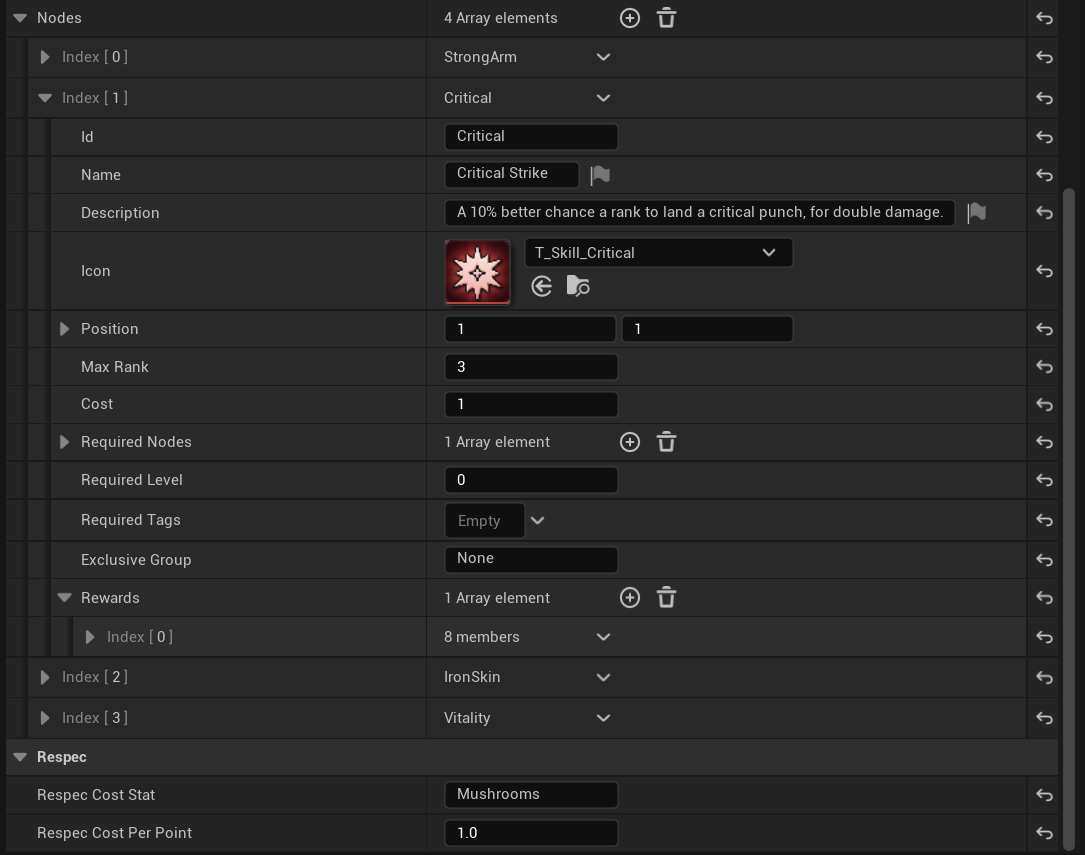
| Nodes | The nodes, below. |
| Respec Cost Stat | A stat a respec takes its price from, such as Gold. None makes every respec free, whatever the cost per point. |
| Respec Cost Per Point | How much of that stat each point given back costs. |
Each node:
| Field | What it is |
|---|---|
| Id | Its name, unique in the tree. Saves, requirements and Blueprint nodes use it. Renaming it loses that node in old saves. |
| Name, Description, Icon | Shown on the tree screen. |
| Position | Column and row on the tree screen, from the top left. |
| Max Rank | How many times it can be learned; 1 by default. |
| Cost | Points per rank; 1 by default. |
| Required Nodes | Nodes of this tree that need at least one rank first. |
| Required Level | The track’s level needed. 0 or 1 is none. |
| Required Tags | Gameplay tags the player must hold: given by rewards, by Add Tag (from a quest, say), or by the player’s ability system. |
| Exclusive Group | Of the nodes sharing a group, only one can be learned: a choice between two paths. |
| Rewards | What each rank gives (rewards). |
A node is Locked (its requirements aren’t met), Available (they are; points may still be short), Owned (learned, more ranks to go) or Maxed.
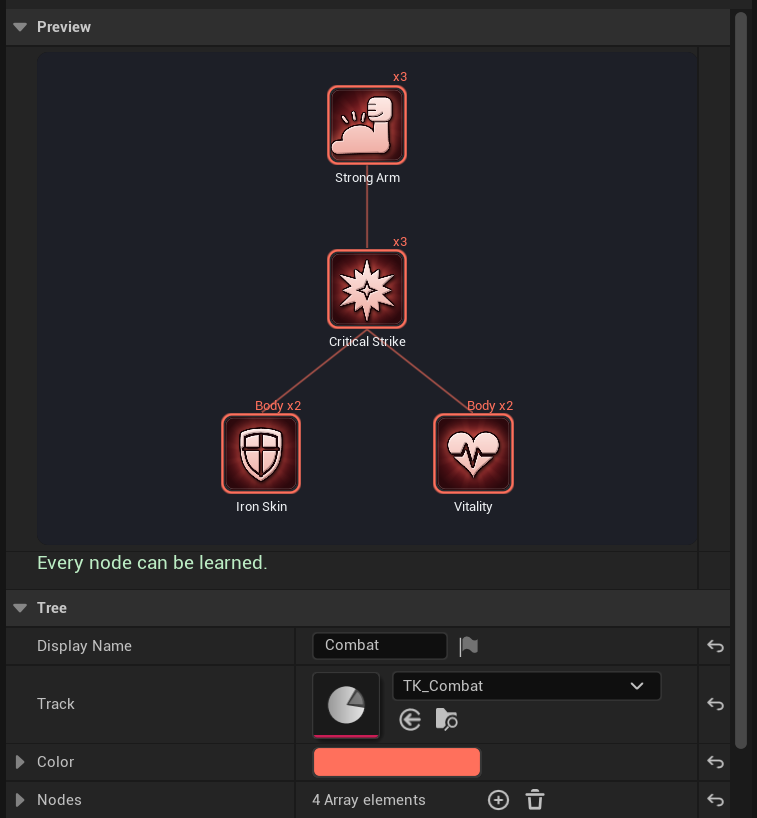
The tree’s Details panel opens with a Preview of the tree as the screen lays it out, and a check under it, both redrawn as you edit. The check lists every error and warning, or reads “Every node can be learned.” when there are none. Saving runs the same check into the Message Log:
- errors: no Track, a node with no Id or one used twice, a node requiring itself or naming no node, and a node no one can ever learn (a cycle, requiring both of a group, a level past the cap);
- warnings, which stop nothing: two nodes in one cell, a tree or node without a name, and a tree that costs more points than its track can give.
| Node (on the tree) | What it does |
|---|---|
| Get Node (Node Id) | The node’s fields; false if the tree has no such node. |
Rewards
Nodes and levels give rewards. A node’s count once per rank; a level’s are kept while the player is at it or above. Unlearning or losing the level takes them back.
| Type | What it gives |
|---|---|
| Tag | Tag, held while the reward is. Other nodes can require it, and Has Tag reads it. |
| Stat | A modifier on Stat of the player’s Stat Component: Op Add adds Value a rank, Multiply adds Value × 100% a rank (0.1 is +10%). |
| Effect | The Gameplay Effect Effect, applied to the player’s ability system at the rank as its level. |
| Ability | The Gameplay Ability Ability, granted at the rank as its level. |
| Event | Calls On Reward Event with Event and the rank; rank 0 when it is lost. For anything else your game does. |
Effect and Ability rewards need an Ability System Component where the Gameplay Ability System usually puts it: on the PlayerState or its pawn, for a Progression Component on the PlayerState; on the pawn, for one on the pawn. A project without it uses the other three.
Progression Component
A player’s XP, levels, trees and learned nodes. It is on the PlayerState by default (settings); it can also go on the PlayerController or the pawn. Get Progression Component finds it from any of the three.
Tracks:
| Node | What it does |
|---|---|
| Add XP (Track, Amount, Source) | Server only. Gives XP, multiplied by the track’s Source Multipliers and Multiplier Stat, and levels up as far as it reaches. Source is an optional gameplay tag saying where it came from. |
| Set Level (Track, Level) | Server only. Sets the level, with no XP into it. Rewards follow. |
| Add Points (Track, Points) | Server only. Points beyond what levels give; negative takes them away. |
| Get Tracks | Every track the player has, with level, XP and bonus points. |
| Get Level (Track) | 1 for a track the player isn’t in yet. |
| Get XP (Track) | XP into the current level. |
| Get XP To Next Level (Track) | 0 at the cap. |
| Get Level Progress (Track) | 0 to 1 through the current level, 1 at the cap: for a bar. |
| Get Points (Track) | Points not yet spent in the track’s trees. |
| Get Spent Points (Track) | Points spent. |
Trees and nodes:
| Node | What it does |
|---|---|
| Add Tree (Tree) | Server only. A tree the player can learn from, with its track. |
| Get Trees | The player’s trees. |
| Learn Node (Tree, Node) | One more rank, for its cost. Called on a client, it asks the server. A refusal calls On Node Refused with the reason. |
| Can Learn Node (Tree, Node) | Whether Learn Node would; if not, Reason says what is missing, a line each. |
| Get Node Requirements (Tree, Node) | Each requirement and the cost, met or not: a tooltip’s checklist. |
| Get Node Rank (Tree, Node) | 0 if not learned. |
| Get Node State (Tree, Node) | Locked, Available, Owned or Maxed. |
| Get Learned Nodes | Every learned node of every tree, with its rank. |
| Respec Node (Tree, Node) | Unlearns every rank of the node, giving its points back, for the tree’s respec cost. Refused while a learned node requires it. |
| Respec Tree (Tree) | Unlearns the whole tree, or every tree when none is given, for the respec cost. Refused, it calls On Node Refused with Node None. |
| Can Respec Node (Tree, Node) | Whether Respec Node would, and if not why. |
| Get Respec Cost (Tree, Node) | What a respec of the node, or of the whole tree without one, takes from the tree’s Respec Cost Stat, 0 when the tree has none. |
| Set Node Rank (Tree, Node, Rank) | Server only. Sets a rank whatever it requires, and adds the tree to the player’s: for cheats, tests and your own rules. Its cost still counts as spent, so Get Points can go below 0. |
Tags:
| Node | What it does |
|---|---|
| Add Tag, Remove Tag (Tag) | Server only. A tag for node requirements, from a quest or anything else. |
| Has Tag (Tag) | Held by a reward, Add Tag or the player’s ability system; a parent tag matches its children. |
| Get Tags | Those of rewards and Add Tag. |
| Get Stat Component | The Stat Component beside it. |
| Field | What it is |
|---|---|
| Trees | The trees the player starts with, besides the settings’ Default Trees. |
| Accept Client Requests | On by default. Off, Learn Node and the respecs called on a client are ignored, and only your server code changes progress. |
Events
On the Progression Component, each on the server and the owning player’s machine. Gameplay that an event starts, such as turning on an ability, goes behind Switch Has Authority, or it happens twice in multiplayer.
| Event | When |
|---|---|
| On XP Gained (Track, Amount, Source) | XP was added, after multipliers. |
| On Level Changed (Track, New Level, Old Level) | A level up or a level set. Old Level is 0 when the track is first seen or a save is loaded, so a load shows no level-up. |
| On Points Changed (Track, Points) | The track’s unspent points changed. |
| On Node Rank Changed (Tree, Node, New Rank, Old Rank) | A node was learned or unlearned. |
| On Node Refused (Tree, Node, Reason) | Learning or a respec was refused, on the server and the player asking. |
| On Reward Event (Event, Rank) | An Event reward’s rank changed; 0 is lost. |
| On Progress Changed | After any change at all: the place to refresh UI. |
Stat Component
Named numbers for a game without the Gameplay Ability System: speed, damage, gold. Each stat is a base value and modifiers, read as (base + adds) × (1 + multiplies). Stat rewards are modifiers on it. Stat rewards, Multiplier Stats and respec prices use the one on the Progression Component’s own actor, which makes one there for a Stat reward when there is none: keep the two on the same actor. The server changes it and it replicates to every machine.
| Node | What it does |
|---|---|
| Get Stat (Stat) | The stat with its modifiers; 0 for one it doesn’t have. |
| Get Base Stat (Stat) | Without modifiers. |
| Has Stat (Stat) | Whether it has a base value or a modifier. |
| Get Stat Names | Every stat it has. |
| Get Modifiers | Every modifier, with its source: a node’s is Tree.Node, a level reward’s Track.L<level>. |
| Set Base Stat (Stat, Value) | Server only. |
| Add To Base Stat (Stat, Delta) | Server only. A negative Delta spends, as gold for a respec. |
| Add Modifier (Stat, Op, Value, Source) | Server only. Source names whose it is. |
| Remove Modifiers (Source) | Server only. Every modifier of that source. |
| Field or event | What it is |
|---|---|
| Base Stats | The stats it starts with. |
| On Stat Changed (Stat, New Value, Old Value) | A stat’s value changed, on every machine. |
Other nodes
| Node | What it does |
|---|---|
| Get Progression Component (Actor) | The player’s Progression Component, from the actor or its PlayerState, Controller or Pawn. |
| Get Stat Component (Actor) | The player’s Stat Component, found the same way. |
| Get Progression UI (Player) | The local player’s UI subsystem. |
| Describe Reward (Reward, Rank) | A reward in words, as the tree screen shows it: “+8% RunSpeed per rank”, “Grants GA_Dash”. Rank 0 is per rank. |
| Find Track, Find Tree (Name Or Path) | A track or tree asset by name (TK_Hero) or path, loaded. None if there is none, or several share the name. |
| Save Progress To Slot, Load Progress From Slot | Save. |
UI
The plugin shows two widgets for each local player:
- the HUD: a bar for each track at the top left with its level, lit with “+XP” as XP comes in, and a toast at the top on a level up, with the points it gave. Gains in one track less than 2.5 s apart add up on the bar: three boxes of 60 in a row show “+180 XP”;
- the tree screen: the player’s trees side by side under their tracks’ levels, XP and points, with the selected node’s details on the right: its stat, effect and ability rewards (say what its tags and events do in its Description), a checklist of its requirements and cost, and the Learn and Respec buttons. A locked node’s tooltip says what it lacks.
The tree screen takes the mouse (hovering selects, a click learns, the wheel zooms, right or middle drag pans), the keyboard (arrows move, Enter or Space learns, R respecs, - and = zoom, Esc or the Tree Action’s key closes) and the gamepad (the left stick moves, A learns, Y respecs, B or View closes, the bumpers change tree, the right stick pans, the triggers zoom).
Get Progression UI returns the local player’s UI subsystem:
| Node or event | What it does |
|---|---|
| Open Tree (Tree, Node) | Opens the tree screen, on that node when given. |
| Close Tree, Toggle Tree | Closes it, or opens and closes it as the key does. |
| Is Tree Open | Whether it is open. |
| Set Hud Visible (Visible) | Shows or hides the HUD, for cutscenes and menus. |
| Get Tree Widget, Get Hud Widget | The widgets shown. |
| Set Glints Shown, Are Glints Shown | Every PT Glint this player sees, on or off; it starts as the settings’ Glints. |
| On Tree Screen Changed (Open) | The tree screen opened or closed. |
Your own widgets
Make a Widget Blueprint whose parent class is PTTreeWidget or PTHudWidget, and set it in the settings.
- With an empty designer, the plugin’s look is built and the fields under Look change it: the tree screen’s Title (“SKILLS”), Blur Strength (9), Node Size (100), Column Step (132), Row Step (204), Min Zoom (0.5) and Max Zoom (1.6); the HUD’s Bar Width (300) and Toast Seconds (3.5).
- With a designer of your own, yours is shown and the plugin’s isn’t built. Read the player’s progress from Get Progression Component and the nodes above; the nodes and events below work the same, and the tree screen takes keys whatever its Is Focusable: Enter, Space or A learns the selected node, R or Y respecs it, and its key, Esc or B closes it.
| Node or event (tree widget) | What it does |
|---|---|
| Select Node (Tree, Node) | Selects and shows the node. |
| Get Selected Tree, Get Selected Node | The selection. |
| Learn Selected, Respec Selected | As the buttons do. |
| Close | As the key does. |
| Get Progression Component | The component the widget shows. |
| On Selection Changed (Tree, Node) | The selection changed. |
| Node or event (HUD widget) | What it does |
|---|---|
| Get Progression Component | The component the widget shows. |
| On XP Shown (Track, Amount) | The HUD showed XP coming in. |
| On Level Up Shown (Track, Level) | The HUD showed a level up: play a sound here. |
Glint
PT Glint, a component: a small sparkle on what the player can pick up, use or train on, shown while the player’s view is within Range of it. It twinkles on a beat of its own.
| Default | ||
|---|---|---|
| Glint On | on | Off hides this one, such as a pickup already taken. Set Glint On changes it in play. |
| Range | 1500 cm | How near the view comes before it shows. |
| Size | 16 cm | |
| Color | warm gold | |
| Is Glint Shown | Whether it shows now. |
Save
The component’s progress saves into your own save game, or into a slot of its own.
- Get Save Data returns a structure with every track’s level, XP and bonus points, the player’s trees, every learned node, the tags given by Add Tag and the Stat Component’s base values. Add a variable of its type, PTSave Data, to your save game and set it.
- Load Save Data (server only) puts it back. Rewards come back with their nodes and levels; the stats’ bases need a Stat Component to come back to. A save holding no trees leaves the player’s trees as they are. The events tell what the load changed: On Level Changed with Old Level 0, On Points Changed for every track, On Node Rank Changed for each node whose rank differs, On Reward Event and On Stat Changed for the rewards gained or lost, then On Progress Changed. On XP Gained doesn’t fire.
- Save Progress To Slot and Load Progress From Slot do both with a slot of their own, one
node each way: slot
Progressand user 0 unless you give others. They return whether it worked; Load returns false for an empty slot, and on a client, where it loads nothing.
Assets are kept by path, and edits since a save keep what still fits: a node or track gone is skipped, and ranks and levels past a new cap are capped.
Multiplayer
The server owns progress. Add XP, Set Level, Add Points, Add Tree, the tags and the stats change on the server only; called on a client they log a warning and do nothing. Learn Node and the respecs called on a client ask the server, which checks them as it would its own (unless Accept Client Requests is off).
The Progression Component replicates to the player who owns it; the Stat Component to every machine, so other players’ speed or health is right for everyone. Rewards apply on the server: tags and stats replicate, and Gameplay Ability System effects and abilities go through the ability system’s own replication.
Debugging
In the console (`), for the first local player:
| Command | What it does |
|---|---|
Progress.XP <Track> [Amount] [SourceTag] |
Gives XP, as Add XP does: 100 without an amount. An unknown tag is left out. |
Progress.Level <Track> [Level] |
Sets the level: 1 without one. |
Progress.Points <Track> [Points] |
Gives points: 1 without a number. |
Progress.Unlock <Tree> <Node> [Rank] |
Learns the node to the rank, its top by default, whatever it requires; its points are given too, and a respec later gives them back again, so a test of both ends with extra points. |
Progress.Respec [Tree] |
Unlearns the tree, or every tree without a name, at no cost. A name it doesn’t find unlearns nothing. |
Progress.Why <Tree> <Node> |
Writes what the node lacks to the log. |
Progress.List |
Writes the player’s tracks, nodes, tags and stats to the log. |
Progress.Glints 0 or 1 |
Hides or shows the player’s glints. |
Tracks and trees are named by asset name (TK_Hero) or path. In multiplayer, type the commands
that change progress on the host: on a client they change nothing. They are left out of Shipping
builds.
Press ' (apostrophe) for the Gameplay Debugger and pick the Progression category by its number: the player’s tracks with level, XP and points, each tree’s learned nodes, tags and stats, live. With an actor selected in it that has progress, it shows that actor’s.
Packaging
The plugin’s settings name their assets by path: the Default Trees, the input action and context, the glint’s material and your own widgets; the tree draws its icons with a material it loads the same way. A packaged game cooks only what something references, so the plugin adds these to every cook itself; nothing needs listing under Project Settings > Packaging.
The plugin’s messages go to the log under LogProgression.