Install
From Fab to the plugin enabled in your project, in a few minutes. It works the same in a Blueprint-only project and a C++ one.
Install it to the engine
- In the Epic Games Launcher, open Fab Library and find Procedural Village Generator.
-
Click Install to Engine and pick your engine version (5.6, 5.7 or 5.8).
The launcher copies the plugin into the engine’s
Engine/Plugins/Marketplacefolder, ready built. Every project on that engine can now enable it.
Enable it in your project
- Open your project and pick Edit > Plugins.
-
Search for
Villageand tick Procedural Village Generator.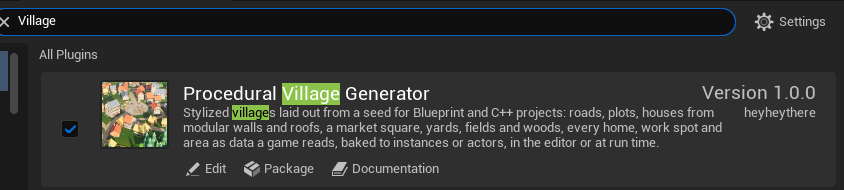
The plugin in Edit > Plugins, ticked. - Click Restart Now. The editor reopens with the plugin on, and the engine’s PCG plugin with it. On 5.6 the editor may say that PCG is a Beta plugin; that’s expected.
Enabling it adds, with nothing else to set up:
- VG Village in Place Actors, the village actor;
- two data asset types, VG Village Type and VG Kit, and the plugin’s own default of each;
- the
Village.*console commands; - the Village Points and Village Clearance nodes in PCG graphs.
The plugin’s own content (the village type and the stylized kit) is under Plugins > Procedural Village Generator in the Content Browser. If you don’t see it, open the Content Browser’s Settings and turn on Show Engine Content and Show Plugin Content: installed to the engine, it counts as both.
Use it from C++
Blueprint-only projects need nothing more. In a C++ project, add the module to your game
module’s Build.cs to call the plugin from your code:
PublicDependencyModuleNames.Add("VillageGenerator");
Then include what you use: VGVillage.h for the village actor, VGLibrary.h for Find Village,
and VGVillageType.h or VGKit.h for the data assets. The how-tos give the C++
beside each Blueprint answer.
[!TIP] A team or a build machine needs the plugin too. Copy its folder from
Engine/Plugins/Marketplaceinto your project’s ownPluginsfolder and commit it; the project then builds it with its own code, so a machine that packages the game needs Visual Studio with its C++ tools, as for any code plugin in a project.In a Blueprint-only project, also open the copied
VillageGenerator.upluginin a text editor and add the line"EnabledByDefault": false,after"CanContainContent": true,. Without it the packaged game is the engine’s ready-built one, without the plugin, and stops as it starts with “Unable to load plugin”. The project keeps the plugin ticked in Edit > Plugins either way.
Update it
When a new version is out, the Fab Library offers it. Close the editor, install it to the engine again, and open your project. A village is rebuilt from its seed, type and kit each time, so your villages come back as they were unless the changelog says a version changes the layout. A baked village is plain actors and doesn’t change at all.
Remove it
- Delete the VG Villages from your levels and the Blueprints that call its nodes. A baked village’s actors are plain actors, but their meshes are the kit’s, inside the plugin: keep the plugin while you keep them.
- Untick it in Edit > Plugins and restart the editor.
[!WARNING] Levels holding a VG Village, and Blueprints using its nodes or assets, don’t load or compile cleanly without the plugin. Remove them before you disable it.